Review and send reminders
Email sending must be enabled for your firm. Review your active outreach policy before scheduling anything.
Approve an email reminder
Section titled “Approve an email reminder”- Open the invoice. Select Follow up or More → Follow up & notes.
- Confirm that the balance is current and the email belongs to the intended billing recipient.
- Write or review the draft. Choose a send date and time within the approved contact window.
- Review the exact recipient, subject, body, and balance. Approve only when those details match the firm’s instructions.
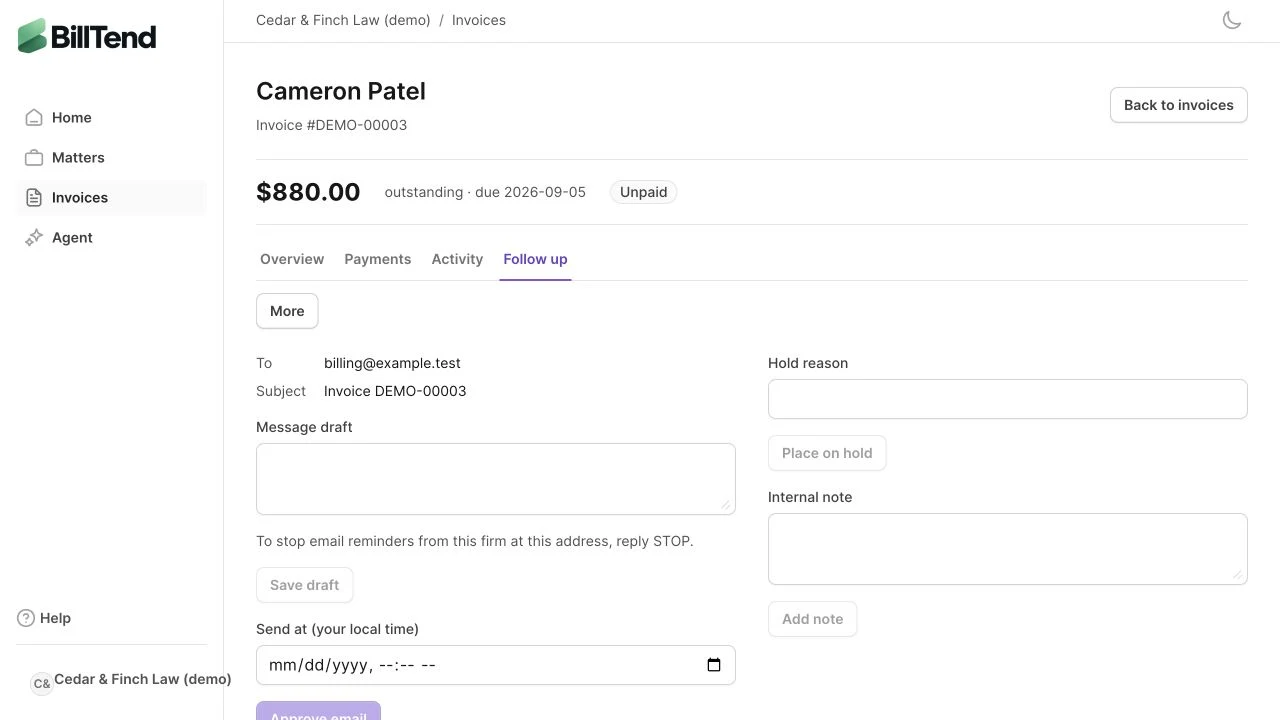
Approval schedules an attempt. Changes to the recipient, balance, hold, dispute, permission, or policy can block it at send time. A stale external balance can block sending until someone verifies it.
Read delivery status
Section titled “Read delivery status”| Status | What to do |
|---|---|
| Scheduled | Check the planned time. Cancel if the invoice needs another review. |
| Accepted by provider | The provider accepted the send. Delivery may still be pending. |
| Delivered | The recipient’s mail server accepted the email. |
| Bounced, Failed, or Complaint | Review the event and confirm the intended contact before any new approval. |
| Unknown | Compare the attempt with provider records. In delivery review, record the evidence and confirmed outcome before considering a new attempt. |
When to pause
Section titled “When to pause”Place the invoice On hold when a client disputes the bill, says they’ve paid, or requests a change in contact. A verified reply automatically pauses the associated invoice. Review any request to stop contact across related invoices before authorizing follow-up. Record a payment only after confirming it independently.
Human calls have a separate specialist approval. SMS availability depends on the sending program.